azdo-userscripts
More Awesome Azure DevOps (userscript)



A collection of userscripts to improve the Azure DevOps UI.
Getting Started
- Install a userscript manager such as Violentmonkey or Tampermonkey
- Refresh this page if you just installed this extension (or the download link won’t work)
- Install this userscript
By default, Violentmonkey will auto-update scripts from the original install location once a day. You can force an update from the extensions menu.
Features
PR dashboard improvements
- Reviews where you are the last reviewer are marked “Last Reviewer” in red
- Reviews show how many files you need to review
- Reviews show build status (if it’s empty, there isn’t a merge commit or a build configured)
- If a PR has bug work items associated with it, we add a label with the severity of such bugs (if SEV == 1 or 2)
- Repo pull request listings will also link to the overall account-wide PR dashboard
- Each PR is annotated with source branch name.
- Target branch is hidden for PRs targeting
mainormaster. - At NI, some labels get coloring (e.g. “bypass owners” gets a red background)
- At NI, reviews are annotated with how long you’ve been on it if it’s been over 1 weekday and you haven’t voted or commented
PR diff improvements
- An Edit button that quickly takes you to the edit UI for that file. No need to have source code or an IDE handy to make a quick edit!
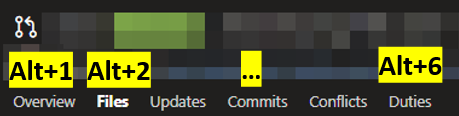
- You can now use keyboard shortcuts to quickly switch between PR tabs (e.g. Overview, Files, etc). In Chrome, it’d be
Alt+1,Alt+2, etc. In FireFox, it isAlt+Shift+Num. See this table for details on your browser. - Not working at the moment: PR threads that start with
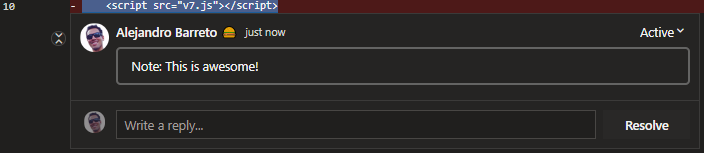
note:(case insensitive) will appear expanded on page load, even if they are closed. They are also highlighted with a light border. Use this to mark interesting things for your reviewers in your PR! - Not working at the moment: PR comments that start with
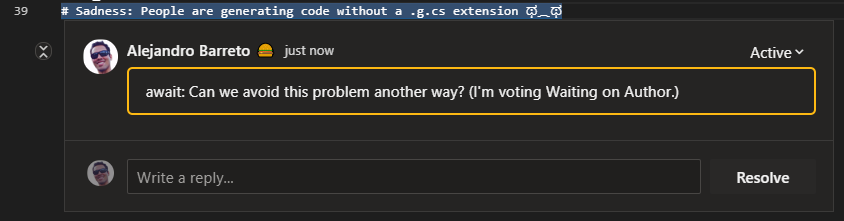
await:(case insensitive) will appear highlighted. Use this to help developers focus their attention on the comments that you want to see again (e.g. the reason why you voted Waiting on Author or Rejected). - Not working at the moment: Folder-level PR diffs are now syntax highlighted!
Note: Not all highlights will be correct; it can only highlight the code that appears in the diff; so multi-line strings may appear weird. Practically, these sorts of issues are rare and overshadowed by the benefit of syntax highlighting in all other cases.
- In the multi-file diff view, which diffs you have expanded/collapsed will now be remembered as you navigate between folders (or between tabs) in the same PR.
Better owners review (NI-only)
These features are only available in NI AzDO accounts.
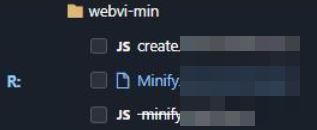
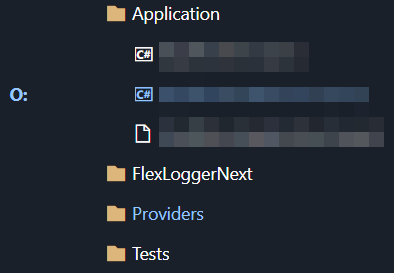
- The PR file tree will now highlight the files you need to review with a letter to represent your role (Owner, Alternate, Reviewer):
- Collapsed folders are highlighted if they contain files you need to review:
- In the multi-file diff view, files that are not your files are automatically collapsed, unless you are the one that filed the PR
- In the multi-file diff view, your files are also highlighted with a blue hedaer (vs. the typical gray)
- Bypass owners reminder: For PRs into branches requiring a passing
ni/owners-approvedstatus, hovering over the Approve button pops up a reminder to consider bypassing owners - Some tags/labels are colored (e.g. red if the label contains “Blocked”)
Reviewer out-of-office annotations
Works out of the box for reviewers signed in with an NI/Emerson account. Users on other tenants/orgs can enable it by supplying their own Azure AD app registration (see below).
Reviewers on a PR are annotated with an Out of Office label when their Microsoft 365 presence shows they are out of office. Hovering the label shows their Outlook auto-reply message (if any).
This is looked up live per-reviewer via the Microsoft Graph presence API, so it is always current. For NI/Emerson accounts it works with no setup — the script signs you in silently using a shared, single-tenant Azure AD app registration the first time you view a PR. Reviewers that can’t be resolved simply show no label.
Overall
- Scrollbars throughout the site will now match the current Azure DevOps color theme
- Drop down menus are bigger!
- Prompts to add links to work items are much less prominent, unless hovered over
- “Show More” buttons on work item forms and on Kanban boards are auto-clicked for you! (But only if the New column is expanded)
- Work item forms show under the comment box who else is following the work item (disclaimer: also shows people that are only following state changes)
Augmented build results view
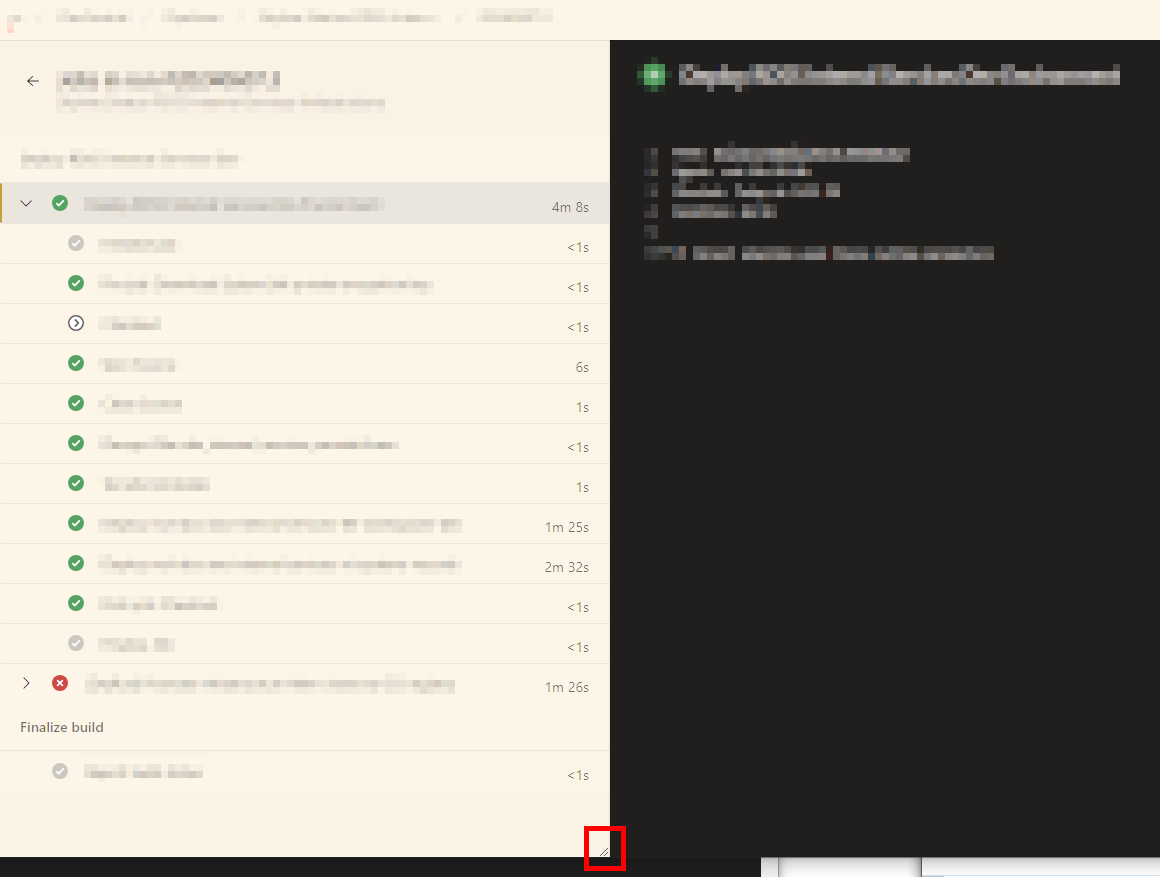
In the builds results logs view, the left pane is now resizable so that job and step names are more visible.
NI-only changes
These features are only available in NI AzDO accounts.
- The build results view will have an additional “Known Infrastructure Errors” section that lists known infrastructure errors under the build step that they occurred in.
- Additionally, in the Errors section, each error item from a build step that had infrastructure errors will be decorated with a warning indicator. All this is intended to make it easier to tell which errors are actual developer errors that need to be fixed.
PREVIEW: Launch a protocol handler to diff NI Binaries
When using this userscript on Windows, a button to launch the “NI Binary Git Diff” protocol handler will be displayed.
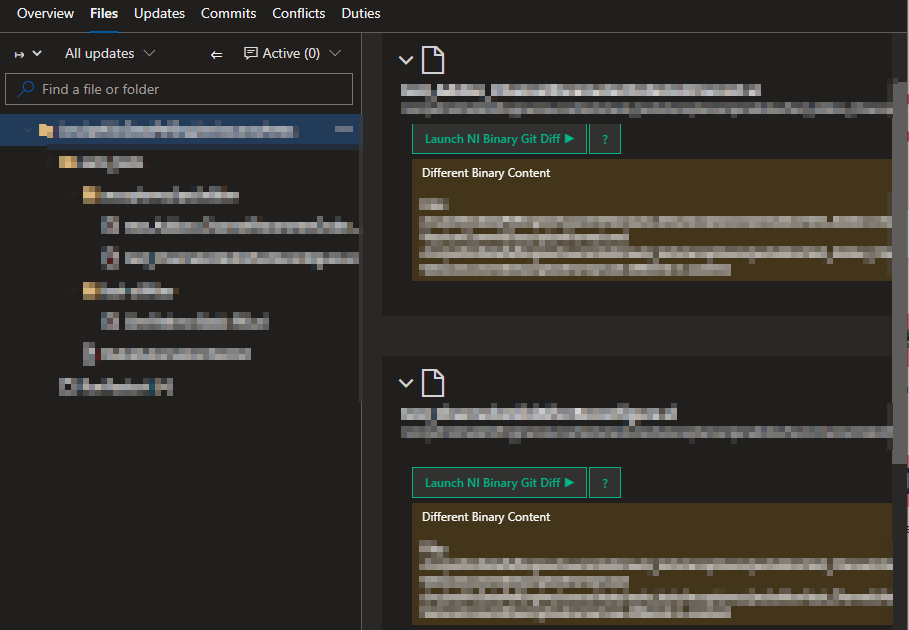
This button will be added to binary files with the following extensions: .vi, .vim, .vit, .ctt, .ctl.
Note: This is a preview feature. Please contact Humberto Garza (NI) for more details and instructions.
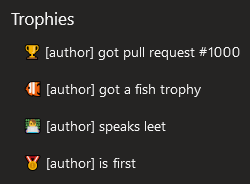
PR trophies
Trophies are awarded for notable PRs and shown in a trophies section on the Overview tab. For example:
Documentation
Maintainers: out-of-office app registration
The reviewer out-of-office annotations use a shared Azure AD app registration so end users don’t have to create their own. A few notes for maintainers:
- The client ID is committed in the script on purpose. This is an OAuth 2.0 Authorization Code + PKCE public client, which has no client secret. The client ID is not sensitive; it is safe to ship in this public repo. It is defined as
OOO_DEFAULT_GRAPH_CLIENT_IDin src/azdo-pr-dashboard.user.js. - The app is single-tenant (NI/Emerson) with delegated
Presence.Read.All, admin-consented once by IT. Only tenant accounts can obtain a token, and only to read presence as the signed-in user. It also requests the standardoffline_accessscope so the script can silently refresh access tokens via a background request instead of a popup; because the redirect URIs are SPA-type, these refresh tokens last 24h, after which one silent re-auth popup is needed. - Redirect URIs are the one thing to manage. Azure AD SPA redirect URIs cannot be wildcarded, and
https://dev.azure.com/server-redirects to the org root (stripping the OAuth params), so the redirect URI must be the org-specific root. Register each AZDO org root your users use as a Single-page application redirect URI on the app registration, e.g.https://dev.azure.com/ni/. To support a new org later, add its root URL there — no code change is needed. - Users on another tenant/org can point the script at their own app registration via the Tampermonkey menu command “OOO Lookup: Configure Graph Client ID” without editing the code.
Privacy
The update URL goes through a URL redirect service to get a rough idea of how many people are using this script. To opt-out, change the update URL to the original download URL your usescript dashboard (or disable updates). This redirect service may also help if the URL needs to change; e.g. if the file is moved or renamed.
No other data is collected. The script is sourced and updated directly from the master branch of this repo.
Credits
Inspired by a PR filtering script originally written by Tian Yu, which faded out approved PRs. Further improved by Alejandro Barreto.
License
MIT. Issues and pull requests welcomed ❤️